

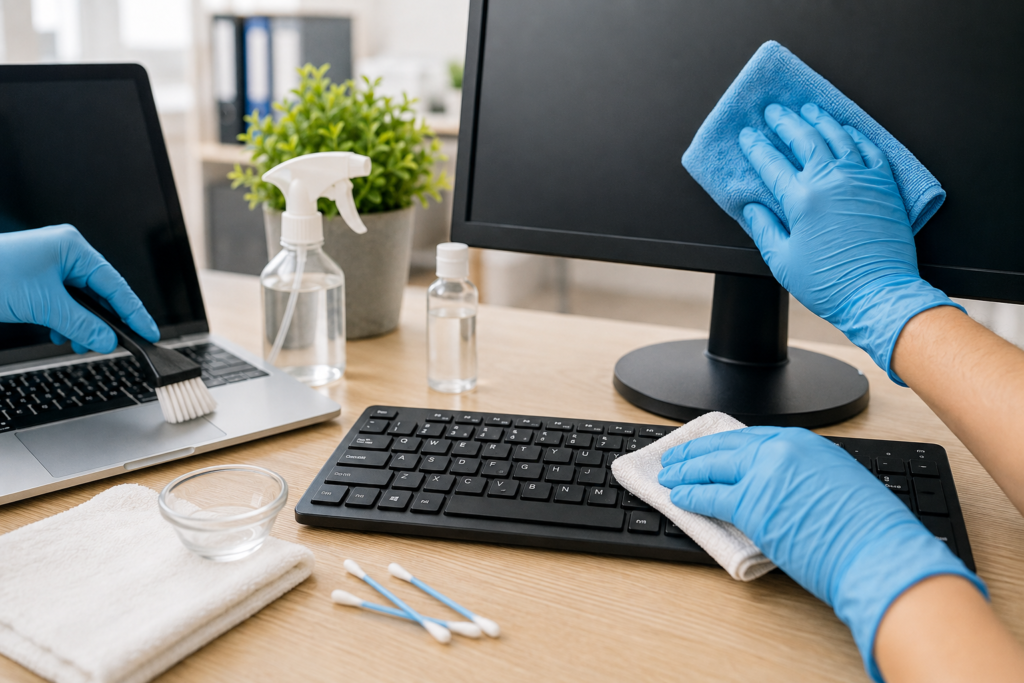
Your desk can get very dirty. You may not see it. But germs, dust and crumbs build up fast.
This is true for your keyboard. It is true for your monitor too. In fact, your keyboard can hold more germs than a toilet seat. That sounds gross. But it is true.
In this guide, we will show you how to clean a keyboard the right way. We will also cover laptop keys and PC monitors. You will learn simple steps. No hard words. Just easy tips you can use today.
How to Clean a Keyboard
Many people ask, “How do you clean a keyboard?” It is not hard. Here is a simple way to do it.
What you need:
- A can of compressed air
- A soft, dry cloth
- Isopropyl alcohol (70%)
- Cotton buds
Steps:
- Turn off your computer first. Unplug the keyboard.
- Turn the keyboard upside down. Gently shake it. Crumbs and dust will fall out.
- Use compressed air. Spray between the keys. This removes hidden dirt.
- Dip a cotton bud in alcohol. Wipe around each key.
- Wipe the top of the keys with a soft cloth. Let it dry fully before you plug it back in.
This is the best way to clean a keyboard without damage. Do this once a week. Your keyboard will stay fresh and clean.
How to Clean a Laptop Keyboard
A laptop keyboard needs extra care. It is more sensitive than a normal keyboard. Water can damage it. So can too much pressure.
Here is how to clean laptop keyboard keys safely:
- Turn off the laptop. Unplug the charger.
- Tilt the laptop gently. Let loose crumbs fall out.
- Use compressed air in short bursts. Hold the can upright.
- Use a slightly damp microfibre cloth. Wipe each key gently.
- Never pour liquid on the keyboard. Never spray liquid directly onto the keys.
If you want a laptop key cleaner, a soft brush works well too. Small, soft brushes get into tight spaces. They are gentle and safe.
How to Disinfect Your Laptop Keyboard
Cleaning removes dirt. Disinfecting kills germs. Both matter, especially in a shared office.
To disinfect a laptop keyboard:
- Switch off the laptop.
- Use a cloth with 70% isopropyl alcohol.
- Wipe each key gently. Do not soak the cloth.
- Let the keyboard air dry before use.
Do this once a week. Do it more often during cold and flu season. This simple habit helps stop germs from spreading at your desk.
How to Clean a PC Monitor or Laptop Screen
Now let’s talk about screens. Cleaning a computer screen is different from cleaning a keyboard. Screens are more delicate. You must be gentle.
Here is the best way to clean a PC monitor:
- Turn off the monitor first. This helps you see smudges clearly.
- Use a dry microfibre cloth. Wipe in gentle, circular motions.
- For tough marks, dampen the cloth slightly with water. Do not spray water directly on the screen.
- Avoid paper towels. They can scratch the screen.
- Never use strong chemicals like ammonia or bleach. These can damage the screen coating.
This method works for how to clean a monitor screen on any device. It is safe for laptops, PC monitors and TVs too.
How to Clean a PC Monitor Screen with Marks or Fingerprints
Fingerprints and marks are common on touchscreens. Here is a quick fix:
- Mix water with a small drop of mild soap.
- Dampen a microfibre cloth. Do not soak it.
- Wipe the screen gently.
- Dry it with a clean, dry cloth straight away.
This method is safe and simple. It works well for most screens at home or in the office.
Why Office Desk Hygiene Matters
A clean desk is not just about looks. It is about health too.
Desks, keyboards and screens collect dust, bacteria and allergens. This can lead to more sick days. It can also affect how focused and comfortable your team feels at work.
Regular cleaning helps in a few ways:
- It reduces the spread of germs and illness.
- It extends the life of your equipment.
- It creates a better impression for clients and visitors.
- It supports a healthier, more productive workplace.
For busy offices, daily cleaning of every desk is not always realistic. This is where professional help makes a real difference.
When to Call in the Professionals
DIY cleaning is great for daily upkeep. But offices need deeper, more regular cleaning too. This keeps the whole workspace hygienic, not just individual desks.
A professional cleaning team can handle:
- Full desk and equipment sanitising
- Shared spaces like kitchens and meeting rooms
- Carpets, floors and high-touch surfaces
- Regular scheduled visits, so hygiene never slips
If you run a business in Shoreditch, our team offers reliable office cleaning services that keep your workspace spotless. We handle everything from desks and screens to full office deep cleans, so your team can focus on work, not cleaning.
Ready for a Cleaner Workspace?
Keeping your keyboard, laptop keys and monitor clean is easy once you know how. A few simple steps each week can make a big difference. Your equipment will last longer. Your desk will feel fresher. And you will lower the risk of germs spreading.
For personal devices, these DIY tips work well. But for a whole office, regular professional cleaning gives you the best results. It saves time. It keeps your team healthy. And it keeps your workspace looking its best.
Want expert help keeping your office clean and hygienic? Get in touch with our commercial cleaning team in Shoreditch today.